Once I turned 30, I started carrying around an aching nostalgia for the way the internet was when I was a teenager, and how "being online" meant sitting in front of the shared family computer. Now that everyone carries devices that can do more than those kids could even dream of, it feels nearly impossible to log out.
These days, I'm so appalled by my recent screen-time reports that I'm embarrassed to share the stats. But I will anyway: almost eight hours a day. (Yikes.) I'm worried I'm wasting years of my life staring at the stupid screen in my hand. I spend hours at night swiping through videos of moms doing laundry, dogs being silly, people making pottery, and other content I don't even remember the next morning.
I've tried app timers, grayscale mode, deleting social media apps, and even switching to a dumb phone for a few days. Nothing stuck. I'd always find a workaround or give up entirely.
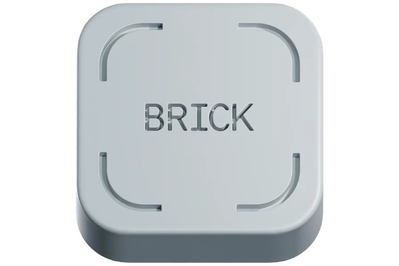
The only thing I hadn't tried, until now, was the Brick, an app-blocking device that I've seen ads for during my hours of daily scrolling. It's a physical device that fits in the palm of your hand and works with a companion app to temporarily lock you out of distracting apps and websites.
I decided to test it for two weeks, bricking my phone every evening and all day on weekends. The results? I actually stuck with it, and my brain feels noticeably calmer. Here's what I learned.
The Brick works through a simple but clever mechanism. You install the Brick app on your phone, select which apps and websites you want to block, and then tap your phone to the physical Brick device. Your selected apps are immediately locked.
To unlock them, you have to get up, find the Brick, and tap your phone to it again. This creates just enough friction to break the automatic habit of reaching for your phone every few minutes.
During my two-week test, I kept the Brick in my bedroom dresser drawer. This meant that if I wanted to check Instagram at 10 PM while sitting on my couch, I'd have to physically get up, walk to my bedroom, open the drawer, and tap the device.
Most of the time, I realized I didn't actually want to check Instagram that badly. The urge would pass. And when I did make the trek to unlock my phone, it was usually for something genuinely important, not mindless scrolling.
After two weeks, I noticed real changes. I was reading more books. I was falling asleep faster. I was more present during conversations with friends. My screen time dropped from 8 hours to about 3.5 hours per day.
The Brick isn't perfect. It requires a monthly subscription after a trial period, which feels a bit silly for a physical device. And determined scrollers can always turn off the app entirely. But for me, it created just enough accountability to help me build better habits.
Would I recommend it? If you've tried everything else and nothing has worked, yes. The physical component really does make a difference. It's harder to trick yourself when there's a tangible barrier between you and your apps.
I'm going to keep using mine, at least for evening and weekend phone fasts. My brain definitely feels better for it.